
AI Image Translator
Use our AI image translator to swap words in any photo into another language — backgrounds rebuilt, text re-typeset, menus and labels still look original.
Feedback
freeTrialImage.bannerPity
freeTrialImage.upgradeUnlock
- ✓freeTrialImage.benefitHd
- ✓freeTrialImage.benefitWatermark
- ✓freeTrialImage.benefitUnlimited
AI Tools
Explore AI tools

Free AI Image
Truly Free AI Image Generator

Image Upscaler
Enhance image resolution effortlessly

AI Color Changer
Transform photo colors in seconds

AI Room Designer
Design your dream room with AI-powered 3D rendering

Skin Enhancer
Enhance skin texture naturally with AI
Face Editor
Enhance face texture naturally with AI

AI Clothes Changer
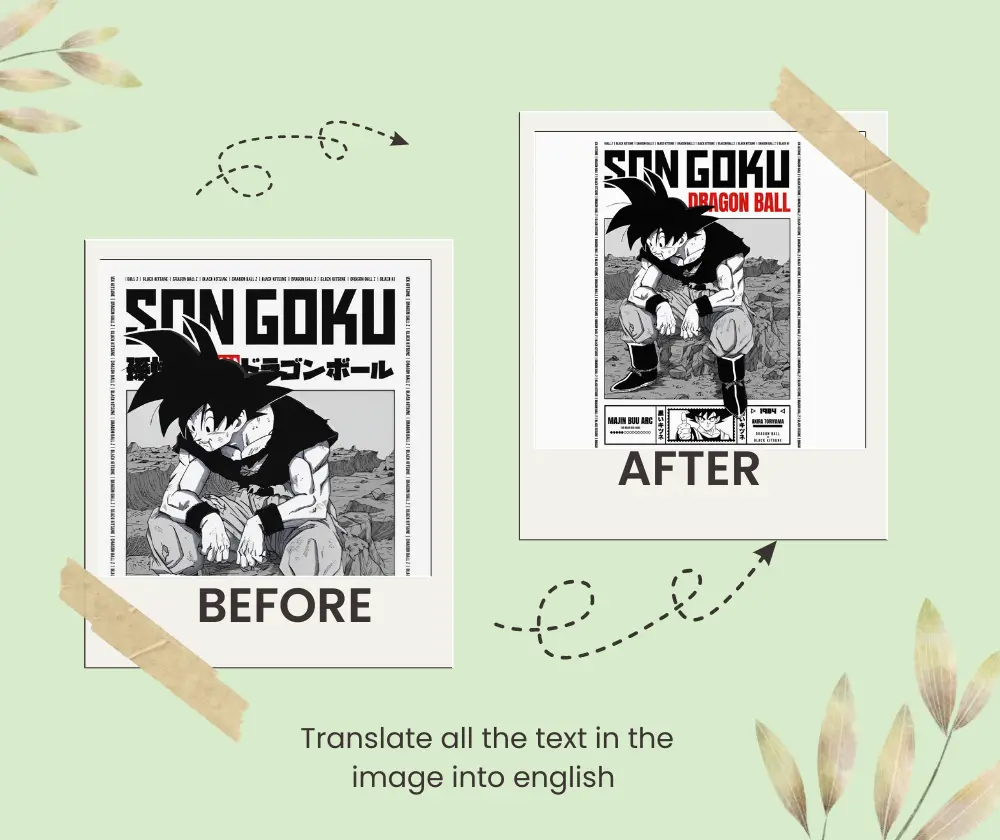
Meet the AI Image Translator Built for Real Photos
This AI image translator reads every line of lettering in a picture, wipes the original words away, rebuilds whatever sat behind them and lays the translation back into place — matching weight, colour and alignment. Menus, packaging, screenshots and scanned pages all work, straight from a browser tab.
- Layout Stays UntouchedBackgrounds, spacing and picture elements are left exactly as they were, so the finished file still reads as the original design.
- Instant, No AccountOpen the page and start right away — nothing to install, no email to hand over, no approval queue to sit through.
- Rare Scripts HandledFrom Spanish and Japanese to Arabic and Chinese, accuracy holds up even on complex characters and dense typography.
How the AI Image Translator Works in Three Steps
Add a picture, pick the language you need and save the rebuilt version — the whole AI image translator flow takes well under a minute from start to download.
Built for Clean, Readable Photo Translations
Character recognition locates the words, generative inpainting erases them, and the AI image translator re-typesets each line in the same spot — so nothing shifts, smudges or breaks the composition.
Layout Kept Intact
Spacing, illustrations and diagrams stay where they belong, so the translated file still lines up with the original.
Design-Aware Typesetting
Every translated string is drawn with a matching font weight, colour and size for a finish that looks native.
Free and Immediate
Everything runs inside your browser, so there is no software to install and barely any wait before results appear.
Broad Language Coverage
Menus, product labels and chat screenshots in most major languages and complex scripts convert without garbling.
Made for Documents
Scanned manuals, packaging and technical diagrams keep their formatting after the wording is swapped out.
Ready to Publish
Check the preview, then save the rebuilt picture at full quality for print, web or quick sharing.
Questions About the AI Image Translator
Straight answers on languages, cost, accuracy and how the AI image translator copes with tricky layouts.
What does this AI image translator actually do?
It locates the lettering inside a picture, removes it, rebuilds whatever sat behind it, and draws the translation back into the very same spot.
Do I have to pay or register?
Basic use is free and works without an account — open the page, drop in a photo and start converting.
Will the design survive translation?
Yes. Background pixels are refilled and the new wording is matched to the original typeface, colour and alignment.
Can it read screenshots and scans?
Screenshots, phone shots of menus, packaging, posters and scanned paperwork are all handled by the AI image translator.
Which languages can it handle?
Most widely spoken languages plus complex scripts such as Chinese, Japanese, Korean and Arabic, with solid accuracy.
Who gets the most out of it?
Travellers decoding foreign menus, sellers localising product shots, and anyone archiving multilingual paperwork.
Make Any Photo Readable in Your Language
Drop an image into the AI image translator and walk away with a clean, share-ready version in the language you need — no software, no sign-up, no fuss.